The first step to getting my devices working for me is to set up a consistent
network for them to use. To do this I am going to use a small pocket sized
router that can be run from a usb battery to act as a hot spot for my devices,
but also as a bridge to an internet connected wifi network.
The network I want to setup looks something like this:
                                                   +
  +---------+                                      |
  |  phone  <<-------+                             |
  +---------+        |                             |
                     |                             |
  +---------+        |  DHCP     PANWIFI           | DHCP    PUBLIC WIFI
  |  laptop <<-------+      +-----------------+    |    +-----------------+
  +---------+        |      |                 |    |    |                 |
                     +---->>>   OpenWRT       <<<----->>>                 +---->  INTERNET
  +---------+        |      |                 |    |    |                 |
  |  camera <<-------+      +-----------------+    |    +-----------------+
  +---------+        |             192.168.x.x/xx  |
                     |10.10.10.0/24                |
  +---------+        |                             |
  |  pda    <<-------+                             |
  +---------+                                      |
                                                   |
        Personal area wifi network                 |  Upstream wifi network
+--------------------------------------------------+---------------------------------------+
I struggled to find a network configuration like this in the OpenWRT wiki. I
wondered for a while if it was because the network was an impossible (seemed
unlikely) or if it was so obvious to not be worth documenting.
Eventually google turned up a
bitbucket page
with a config that worked
perfectly.
I need to find a method which makes it straight forward to configure a new
outgoing network. I think at the moment I am going to have to edit the wifi
config files to make any changes. On the road that will be less than ideal.
From
Stevens TCP/IP Illustrated Vol 2
:
We will see the comment /* XXX */ throughout Net/3. It is a warning to the
reader that the code is obscure, contains nonobvious side effects, or is
quick solution to a more difficult problem.
The second volume of that series might be one of the best networking books ever
written. Not because it is a good tome to learn networking from, it is instead
a guide into the heart of a real system. It is close enough today to use as a
starting point for finding out where things are and a step to finding out why
they are.
It is where I go when I want to find out how my current machines get bytes from
an application to packets on the wire.
For about as along as I have been using terminals I have had them set to a dark
theme, for a while at the beginning I had my terminal set up to be green text
on a black background. I might have been the l33test mutherfucker around.
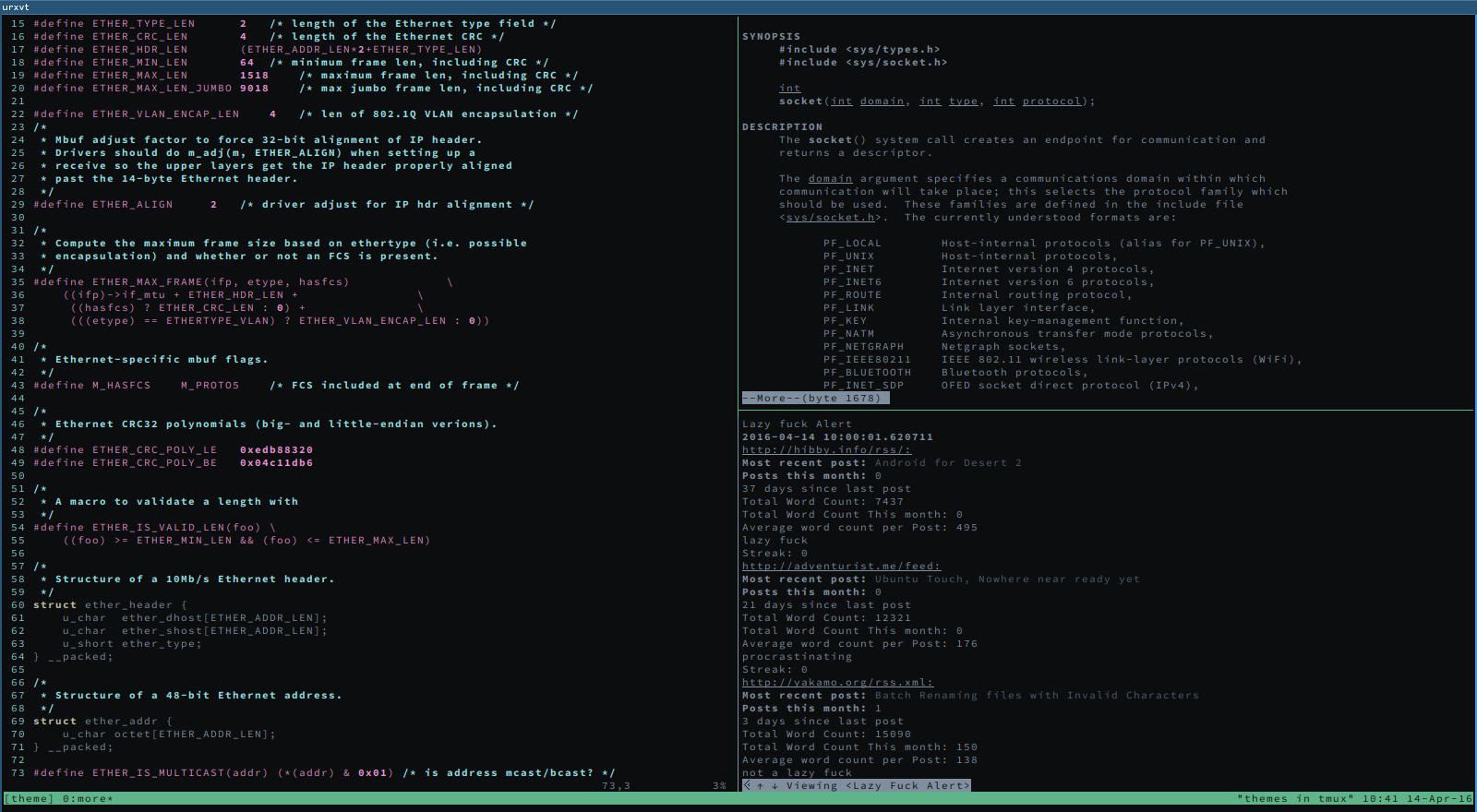
! Zenburn theme
! black + red
urxvt*color0:      #101010
urxvt*color1:      #705050

! green + yellow
urxvt*color2:      #60b48a
urxvt*color3:      #f0dfaf

! blue + purple
urxvt*color4:      #506070
urxvt*color5:      #dc8cc3

! cyan + white
urxvt*color6:      #8cd0d3
urxvt*color7:      #dcdccc

! bright-black + bright-red
urxvt*color8:      #000000
urxvt*color9:      #dca3a3

! bright-green + bright-yellow
urxvt*color10:     #c3bf9f
urxvt*color11:     #f0dfaf

! bright-blue + bright-purple
urxvt*color12:     #94bff3
urxvt*color13:     #ec93d3

! bright-cyan + bright-white
urxvt*color14:     #93e0e3
urxvt*color15:     #ffffff
I moved to
Zenburn
from the unreasonably popular
solarized
at some
point last year. When I moved I went through a few themes trying things out. I
found that .Xresources supports cpp macros making it easy to swap themes.
!.Xresources
urxvt*scrollBar:      false
urxvt*matcher.button: 1
urxvt.transparent:    false
urxvt*allow_bold:     true

Xft*dpi:              96
Xft*antialias:        true
Xft*hinting:          full

URxvt*geometry:       85x16
URxvt*fading:         0
URxvt*tintColor:      #ffffff
URxvt*shading:        0
URxvt*inheritPixmap:  False

#include ".papercolour"

URxvt.urlLauncher:    firefox
URxvt.matcher.button: 1

URxvt*font: xft:Source Code Pro:size=8
I tried to work outside quite a few times last year. Dark themes for terminals
are really hard to see in bright sunlight. For some reason yeahconsole doesn't
like the way I include themes and stayed with a default light theme. The light
theme is really easy to see in sunlight. The contrast in readability made me
really question using a dark theme at all.
At camp last year most of the daylight hours I spent on my laptop were inside
our super tent, direct sunlight made my screen hard to read and the sun seems
to melt my skin. My dark theme was okay to read in the tent, but it was no good
outside, with the sun melting I just hid away until it was night time.
The sun being bad, I am grateful I live in Scotland, we don't have to put up
with the sun very often(this is a joke, it is always fucking sunny, I want a
refund).
When the sun isn't around I do quite like to sit in darkened rooms when I am
hacking. If you too are a vampire you might have noticing the eyeball explosion
that happens when you switch from your friendly terminal to the light explosion
that is a web browser. Pretty much every web page has a light theme, I
actually dislike dark themed web pages, I always think the designer is being up
front with how much of a douchebag they are.
Anyway, this is a lot of words for
"I have moved
to a light theme"
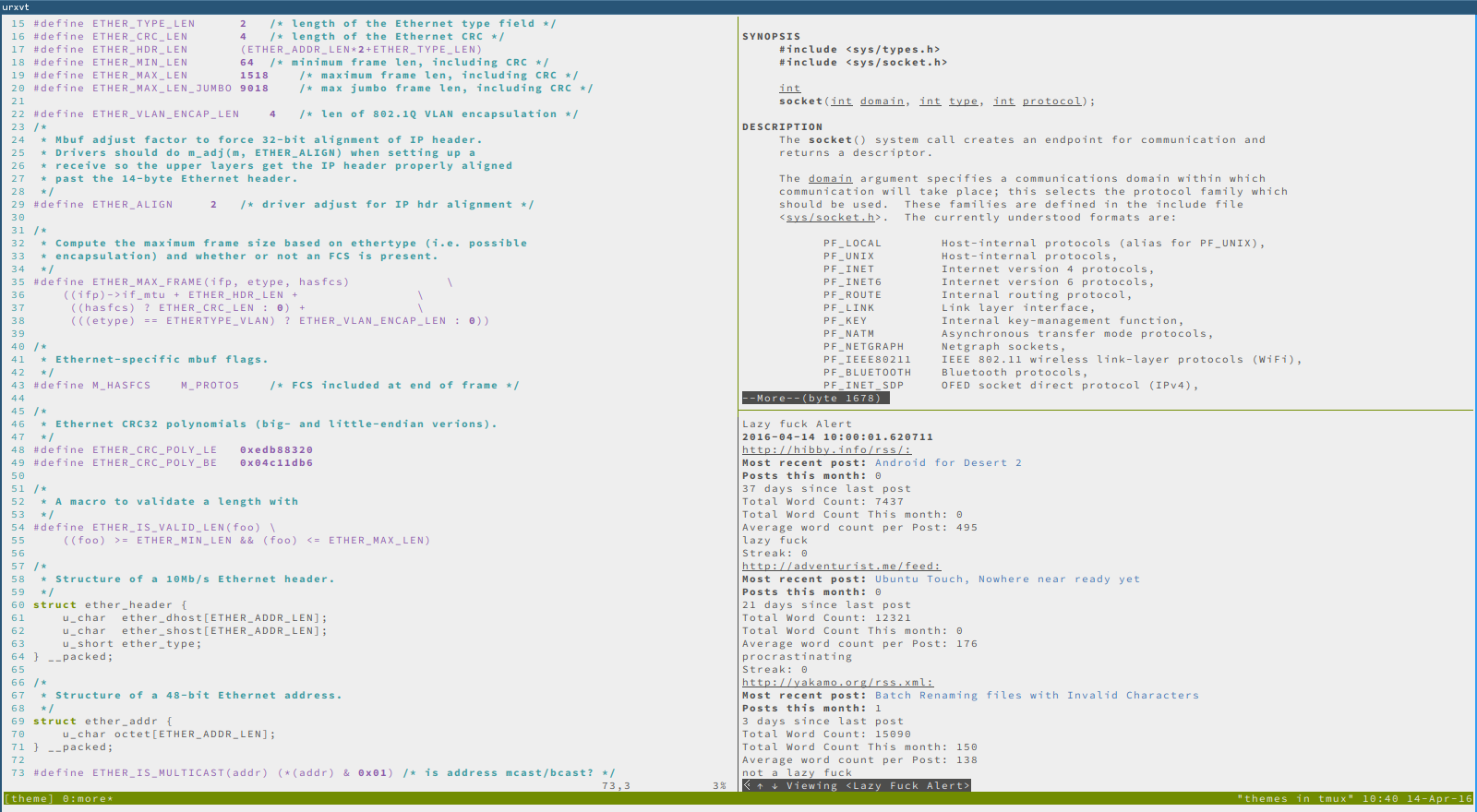
! PaperColour Theme

URxvt.foreground: #4D4D4C
URxvt.background: #EEEEEE

! black
URxvt.color0: #EDEDED
URxvt.color8: #969694

! red
URxvt.color1: #D7005F
URxvt.color9: #D7005F

! green
URxvt.color2: #718C00
URxvt.color10: #718C00

! yellow / orange
URxvt.color3: #D75F00
URxvt.color11: #D75F00

! blue

URxvt.color4: #4271AE
URxvt.color12: #4271AE

! magenta
URxvt.color5: #8959A8
URxvt.color13: #8959A8

! cyan
URxvt.color6: #3E999F
URxvt.color14: #3E999F

! white
URxvt.color7: #4D4D4C
URxvt.color15: #F5F5F5
I dropped my android phone at congress, I was trying to figure out which
direction to walk in the compass was spinning wildly being absolutely no help.
I slide the phone into my pocket missed and the screen cracked on contact with
the ground. The phone had a terminal diagnosis then, but I soldered on for as
long as I could.
Eventually the nexus 5 dropped the cellular network and I travelled 40 minutes
to a vet when I didn't need to. The next day I jumped on to the bq site and
ordered my ubuntu edition E5.
The BQ sales process was just terrible, it didn't help that my email
provider decided I didn't need to receive email that weekend. The BQ site is
really badly laid out, confusing and proactively difficult to login to and view
your orders. They don't offer tracking number, so I don't know where the extra
€10 'international' shipping went.
The ubuntu touch os out of the box is annoying as any other smart phone, you
are run through the standard dialog that asks mostly pointless questions. The
version of ubuntu touch that ships on the E5 is "really old" (with really old
being may 2015, 9 months prior). I was unable to install anything from the
ubuntu app store (well I installed a hex colour picker, but that doesn't count).
I tried to check for updates, but the phone was happy believing it was all up
to date. I searched for a while, but any search term with 'ubuntu touch'
results in ubuntu users having issues with their touch screen laptops.
Eventually I fell into the #ubuntu-touch irc channel and asked.
And I waited...three hours later on my third time asking someone suggested I
try updating. There isn't wifi at work, I wondered if the ubuntu touch os is so
broken it won't acknowledge user settings and will only
look
for updates on
wifi. I tried at the hackerspace later that night and I managed to update to
OTA9.1. This is the latest release version.
I don't know how this operating system is for. I have been using free unix
desktops for a decade, I can't see anything in ubuntu touch that I want. The
default system shows a collections of scopes, scopes are an advertisers dream.
There are default scopes like, weather, music, video, news and the scopes are
populated by scope apps that create a feed for each theme. There are loads of
different input services for them as well, so if you use facebook, instagram,
flicker, 500px you will have a nice full feed. If you use one, or none of them
you won't have anything. I saw the scopes and thought of windows crap wear.
I turned off all of the scopes as soon as I could.
Here is a short list of issues I encounter:
Out of the box
-
No updates were shown as available on 3G
-
Updates became available to download on wifi
-
Unable to download apps from the ubuntu app store
-
Unable to run any software other than browser
-
No way to find out the phone was an entire naming scheme behind without wifi
-
The UK (and English) support site doesn't mention the Ubuntu Editions at all. The Austrian one does.
General System issues
General App usage
Specific Apps
Other
people agree
, I have
installed android
and life is better.
I am making my email setup better. I have moved hosts to
Fastmail
(referrer
link) and I am setting up mutt to work with folders correctly. There is a patch
for mutt called
mutt-sidebar
which gives a list of folders in a side pane
in mutt, much like the interface would be on the web.
Looking at
Freshports
it looks like the sidebar patch is part of the
FreeBSD port, but it isn't setup by default. I wanted to check this and looked
for the option in
pkg
to list the build options. There is the pkg query
command that will show information about installed packages, but it is a little
mental to use.
I found how to use pkg query to list the build options for a pkg in the
wiki
.
$ pkg query "%n is compiled with option %Ok set to %Ov" mutt
mutt is compiled with option ASPELL set to off
mutt is compiled with option COMPRESSED_FOLDERS set to on
mutt is compiled with option DEBUG set to off
...
mutt is compiled with option SIDEBAR_PATCH set to off
...
That tells me that I new to build mutt from the port and turn sidebar patch on.